“Give me six hours to chop down a tree and I will spend the first four sharpening the axe.”– Abraham Lincoln
Many aspects of the deposition process cannot be controlled, but attorneys can ensure that they—and their witnesses—are well prepared by reviewing key facts, documents, and timelines ahead of the deposition. The problem is that depositions often take place long before review is complete, so there are still large document volumes for the case team to face. Frequently, thousands of relevant documents and emails are attributed to a given witness.
Relying on search terms exclusively is a good way to miss key documents—and, sometimes, big parts of the picture. Missing those documents can mean missing an opportunity to get to the meat of a matter during witness depositions, resulting in missed opportunities to strategize, settle, or stake a claim. Fortunately, for teams using a modern e-discovery platform, several features can help with this sometimes daunting task.
1. Declutter with email threading and near-duplicate analysis.
While the discovery process can distill very large collections into smaller volumes of largely relevant documents and email, often this distilled content is highly duplicative. Every email in a hot thread is represented, from the earliest message to the final reply. Every version of a hot proposal is kept, even versions where only small typos are corrected or the document is converted from Microsoft Word to Adobe PDF. Run search terms across this distilled content and the result is the same: virtually the same documents and emails, over and over.
Two text analytics tools that can quickly declutter a collection are email threading and near-duplicate analysis. Email threading identifies the messages that are part of the same email thread, enables grouping by thread, and calls out inclusive emails—in other words, the final replies or forwards that include the previous messages.
For deposition preparation, just include the inclusive email and attachments in your content for attorneys and witnesses. This cuts out redundant messages and makes prep materials much easier to digest.
That helps cut down on email, but what about all the loose documents and attachments? A relevant document could have many versions that are all factually relevant—for example, multiple drafts of a presentation. But while preparing for depositions, attorneys complain that they are seeing the “same document over and over again.” They just need to get to the heart of the information as quickly as possible, without wasting time comparing proofread and rough drafts to identify differences.
Near-duplicate analysis identifies documents that have largely the same textual content and groups them together. An attorney preparing for depositions can quickly review just one document from each group. This simple technique reduces clutter by removing the repetition in a collection.
2. Use clusters to find out what you don’t know.
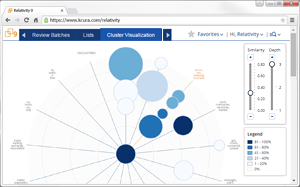 Clustering, another text analytics feature, quickly gives teams a sense of what’s discussed in their collection of documents. Attorneys may think of clustering as a tool primarily for early case assessment (ECA). For example, clustering is often used on the initial and much larger collection ahead of review. Taken one step further, clustering can be applied to any set of documents and can be equally useful in navigating smaller sets at the end of discovery. In Relativity, for example, you can select a set of target documents and run clustering as a mass operation—automatically grouping your most critical documents into conceptually related groups. This simple process can be completed in minutes.
Clustering organizes documents into groups based on thematic content with no human input required. This is sometimes called “concept grouping.” The benefit for attorneys preparing for depositions is that they can quickly get a sense of the type of content in a collection. The clusters are named for words that represent the thematic groupings and can be divided into more narrowly focused sub-clusters represented by an easily navigated folder tree and visual map, which allows you to see not just the clusters themselves, but how they relate to one another. This can be a quick way to find the documents related to a particular topic or to identify unexpected sets of documents for a given witness.
In short, clustering helps answer a critical question ahead of depositions: “What have I missed?”
3. Expand your net with concept searching.
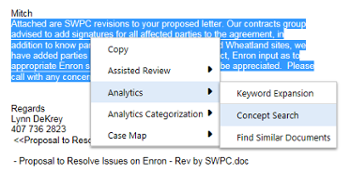 Keyword search is an effective way to find documents when looking for something specific, such as a patent number. But when you’re looking for emails and documents related to a general topic, it can be difficult to find the right keywords. That’s where concept search, also enabled by text analytics, can come in handy: It helps you find documents even when the exact words or phrases at the heart of a matter are unknown.
Concept search enables teams to put in a chunk of text—even a paragraph or more—and search for documents that are conceptually similar to that block of text. The documents returned are sorted by how closely they match the text conceptually. The benefit is that you’ll find documents discussing the same topic, even if they don’t use the same words to describe it.
For example, an attorney who receives a new document from opposing counsel a few days before her witness is to be deposed may want to see if anything similar exists in the witness’s collection. Concept search will do just that. Enter some or all of the text from the trial exhibit and you’ll find any conceptually related documents.
4. View the big picture through fact management.
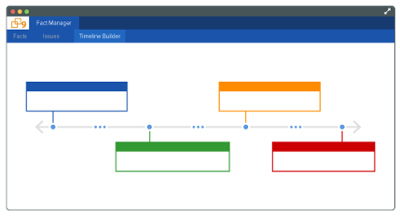 When it comes to preparing for depositions, one of the most productive ways for your team to spend your time is to take a high-level look at key facts about the case and analyze where different pieces of information intersect. This could include events, people, legal issues, places, dates, documents—any item you can track in your e-discovery software—and how they all relate. It’s important to look at your case in this manner to properly strategize.
In Relativity, Fact Manager—available for free to users—is useful for recording and organizing this type of data. In an application like this, you can capture the facts of your case and link issues, people, and events to key documents. Our team uses the tool to enter details about facts as they emerge and evolve during the case lifecycle. Fact Manager then creates useful reporting capabilities like a chronological timeline that can be used to go over the big picture of a case before deposition.
When preparing for deposition, it is well worth the time investment to set up and use these four useful tools. When faced with a large document volume and limited time to prepare for depositions, don’t rely only on simple keyword search. Nailing the deposition can bring a powerful case strategy to fruition.