

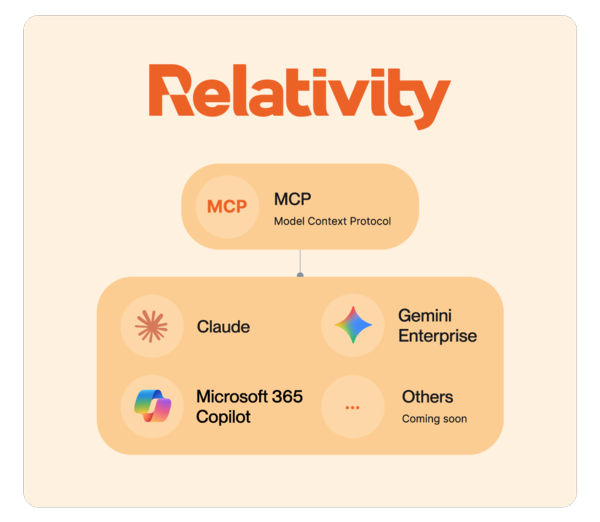
The Model Context Protocol (MCP) integrates external AI applications with RelativityOne, making it easier to stand up workspaces, organize case data, and manage legal operations through natural language. The MCP now supports connections to Claude.ai, Claude Cowork, Claude Code, and Google Cloud Gemini Enterprise. The MCP also supports Microsoft 365 Copilot with a subset of the capabilities below.
When a new legal data project arrives, the clock starts ticking. Loudly. Everyone wants work to begin as quickly as possible – but before teams can dig in and before Relativity aiR can analyze, someone has to do the administrative work that makes everything else possible.
Create the client. Stand up the matter. Provision the workspace. Modify templates. Configure permissions. Validate access. Check governance requirements.
For legal operations teams, that administrative runway is familiar territory – been there, done that. But it takes time to move down the line of setup tasks.
The Model Context Protocol is designed to help close that gap – bringing intelligent orchestration to where legal work gets done. Now, administrators can conversationally ask Claude and Google Cloud Gemini Enterprise to execute many common tasks in the platform, accelerating the path from trigger event to active analysis, with the administrative lift handled by the AI applications and the substantiative legal work driven by aiR.
aiR remains Relativity's purpose-built AI for legal data intelligence workflows on case data itself, allowing teams to conduct transparent data analysis grounded in the evidence. The connector integrates Relativity's extensible platform with Claude's surfaces across Claude.ai, Cowork, and Claude Code, and Gemini Enterprise – enabling administrators to report on usage, surface operational insights, and automate administrative actions conversationally. All of the data remains in the safety of our platform, where users can analyze their data, discover the truth, and act on it.
Let's talk a little more about what this means, how it works, and what RelativityOne users can expect from the integration.
What Is an MCP and What's Relativity's Approach?
MCP is an open standard for connecting AI assistants to the systems where the work they're asked to execute happens. The legal AI space is moving fast, and many teams are eager to connect AI assistants directly to legal platforms – letting models query data, draft outputs, and take action across matters. Such integrations can be impressive, but they can introduce risk if not approached with the thoughtful governance, auditability, and security posture legal work demands.
We built Relativity’s MCP connector with these realities of legal work in mind. Our integration with Claude and Gemini Enterprise is designed for teams and power users who are already working with these tools, giving them a powerful new way to interact with RelativityOne from the surfaces they are already using. But we've always believed the smoothest and most secure experience for most users happens inside the platform, so that's where your data stays, context is preserved, and workflows are governed.
With this connector, a system administrator can make requests via Claude or Gemini Enterprise in natural language. These tools then determines which tools to call, and actions to execute under the authenticated user's identity. These actions are fully audited in RelativityOne, attributing every action to the user who triggered it to maintain the trust and defensibility users expect.
This is the beginning of a longer roadmap – one that starts with administrative orchestration and will grow. As AI adoption continues to mature, we expect the scope of what's possible conversationally to expand.
What You Can (and Can’t) Do with Relativity’s MCP Connector Today
Using Claude or Gemini Enterprise, RelativityOne users can simplify and automate high-volume administrative tasks that they perform in the UI today, including:
- Client and matter management
- Workspace creation
- Group and permission management
- Access and governance reviews
- Usage reporting
- Operational summaries
We purposefully started with capabilities that allow you to orchestrate the work surrounding a matter, rather than the evidence and work product of the matter itself. When it’s time to upload, process, search, and review the substantive work of the matter, that happens inside RelativityOne with the full functionality of our platform. Analysis on legal data is still conducted by aiR. Claude or Gemini Enterprise won’t code documents for you.
The power of this connector comes from unlocking the creativity of each of you – our most experienced users – can leverage to make the most use out of it. But to help spark your imagination, here are just a few use cases that I found particularly exciting.
From Trigger Event to Active Analysis, Faster
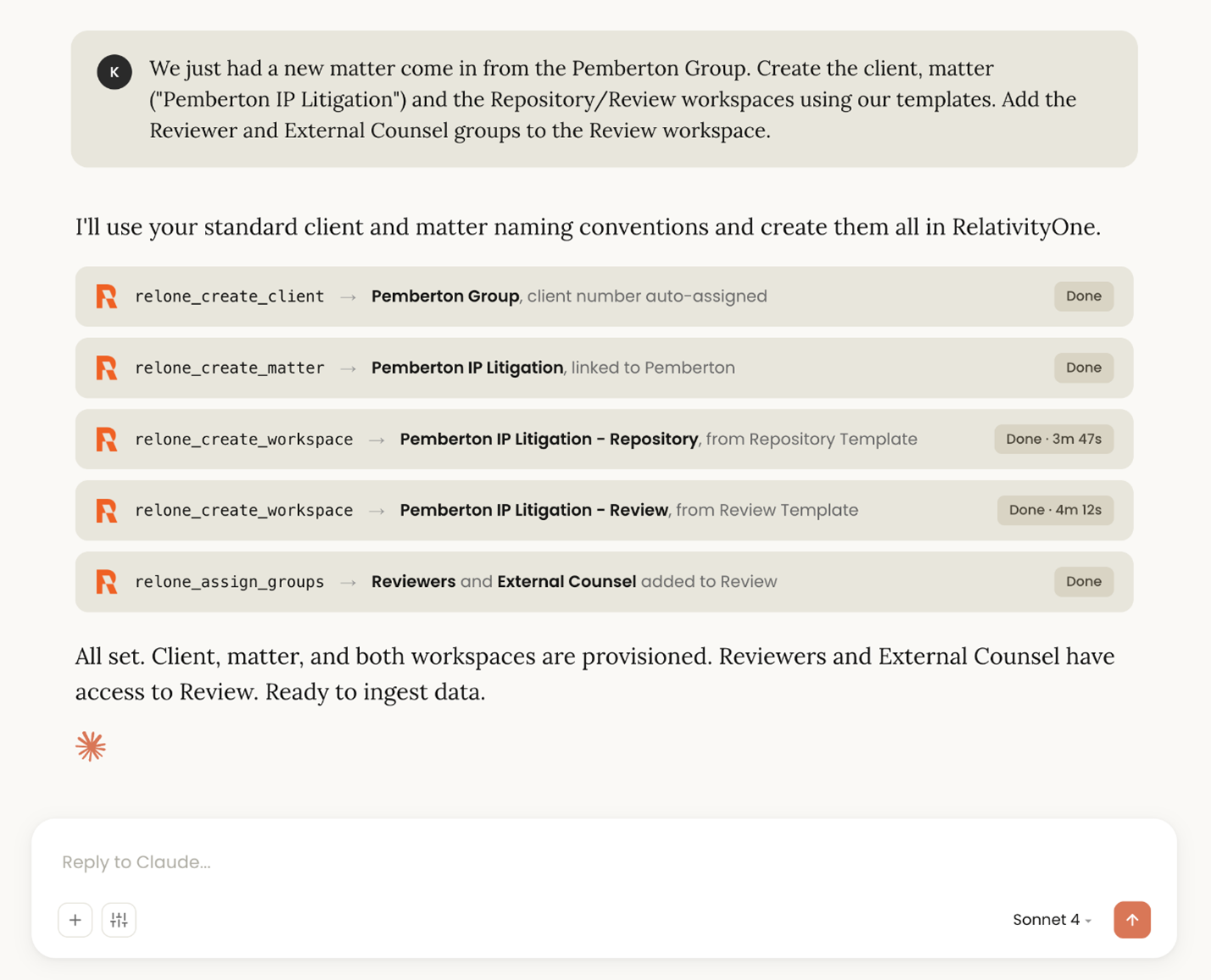
We've all been there (and by “we,” I mean just about anyone who's reading this blog): it's late on a Friday night, a new matter just started, and the case team wants to start reviewing this weekend. Great, let's go create a new workspace. Oh wait, this is a new client, so first you need to create the client. Then the matter. Now it's time to create the repository and review workspaces.
The work isn't done yet, though, because you need to wait for those to be created before you can add groups to set the case teams free. It can be a lot, and it's a Friday night in July when you just want to go to bed at 8 hang out with friends.
The MCP connector can orchestrate the creation of:
- The client
- The matter
- The workspaces
- Group access
With a single prompt in Claude or Gemini Enterprise, you can kick off that process, go get changed for a night out, and come back to a new workspace all set for a happy case team.
Use AI Applications as a Workspace Design Partner
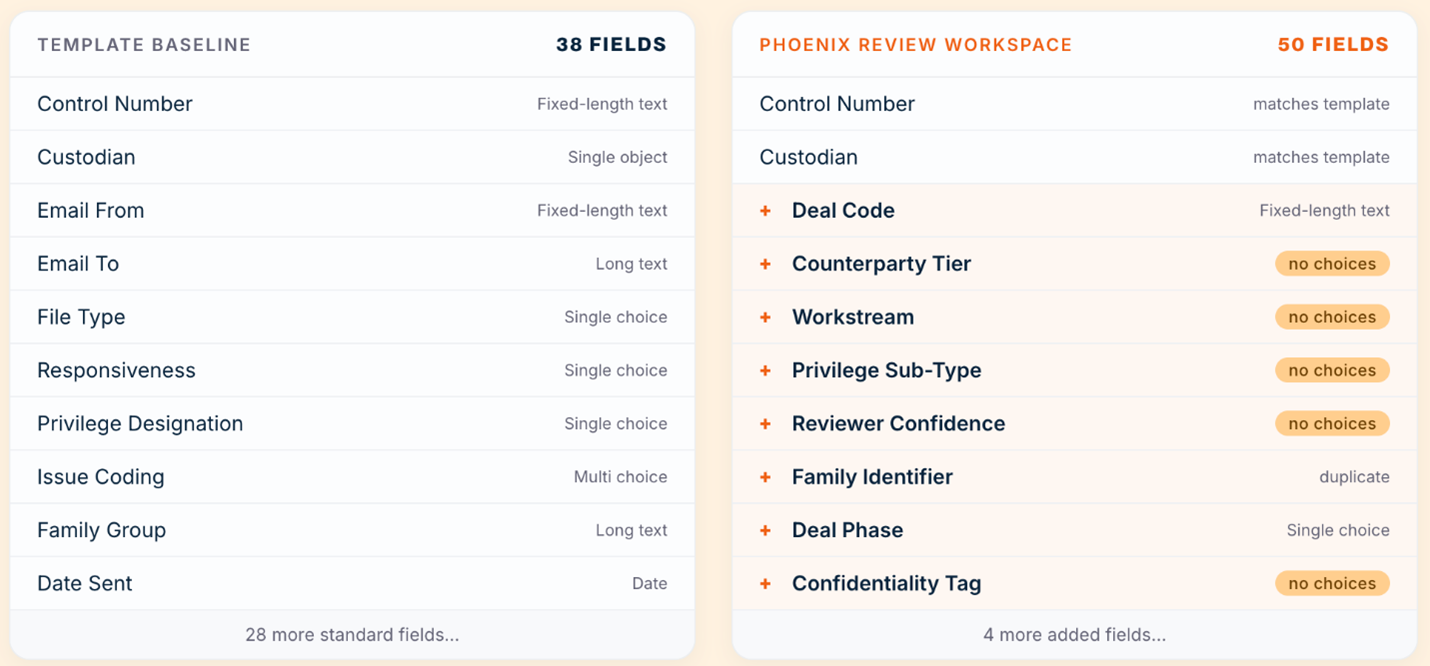
While your templates may get you 90 percent of the way there, sometimes you’ve developed specialized fields for a particular client or matter type. Finding those unique fields and choices requires navigating to each workspace, filtering through a list of document fields, and comparing them side by side in two tabs.
Now, you can simply ask Claude or Gemini Enterprise: I'm setting up a workspace for a False Claims Act investigation. Compare the document fields in our standard review template with the recent investigation workspace and give me a list of all unique fields and choices.
The connector will return a structured summary of deviations from the baseline template. This not only reduces administrative overhead – it prevents inconsistent review behavior once the matter is already underway.
Making Governance Conversational
Matter lifecycles don't end when document review does. The MCP connector makes governance workflows more accessible without cutting corners.
Identify Workspace Access Instantly
One of the most common governance questions is also one of the most time-consuming to answer: Which workspaces can this user – or this client – access?
Finding the answer requires cross-referencing multiple reports and stitching together results. It sometimes ends up feeling like half a day of clicking around to assemble a comprehensive response.
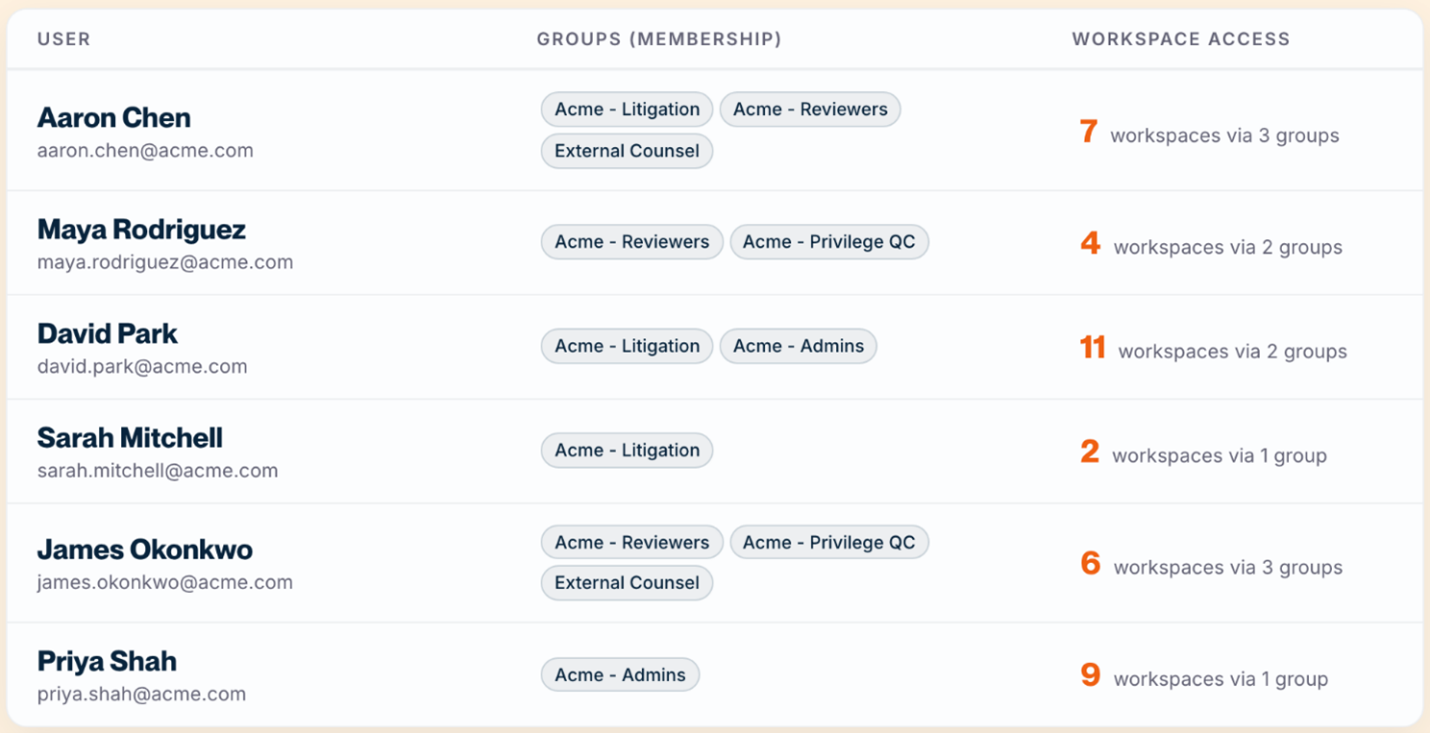
With the MCP, an admin can ask: Build me a report of all users associated with [Client Name], including which workspaces they have access to and through which groups.
Claude or Gemini Enterprise can output a comprehensive report ready to share with the team: every workspace, every relevant group, and every associated user.
Audit Workspaces to Identify Template Drift
Templates set the standards for review, but individual decisions can cause workspaces to drift from best practices. Fields get added for a specific matter, layouts get modified mid-review, choices get renamed or reordered. Over time, it becomes hard to know which workspaces still reflect your standard configuration and which have accumulated undocumented customizations.
You can ask Claude or Gemini Enterprise to compare any workspace against the baseline template and surface exactly what has changed: Compare the document fields, layouts, and views in the [Matter Name] workspace against our standard review template. List everything that has been added, modified, or removed.
Claude or Gemini Enterprise returns a structured summary of every deviation – new fields, renamed choices, modified layouts – organized by type. Use that output to decide what to carry forward into future matters, what to standardize back to the template, and what to flag for the team before review begins.
Real-Time Visibility into Operations
Operational reporting has traditionally required a mix of saved searches, exports, spreadsheets, and manual formatting. The MCP allows administrators to ask portfolio-level questions via AI applications and receive client-ready outputs assembled from current data.
Surface Portfolio-level Trends
Effective operational reporting has previously required custom workflows or applications. Clients and leadership often want to ask questions like:
- Which practice groups have grown fastest?
- Which matters are inactive but still unarchived?
- Where is workspace usage increasing?
- Which users or clients are expanding utilization?
Now, ask Claude or Gemini Enterprise any of these questions and get a structured answer assembled from live RelativityOne data. Using these tools, you can take it further and package those results into a customized report, an interactive dashboard, or any formatted output your team needs.
Generate Client QBR Briefs
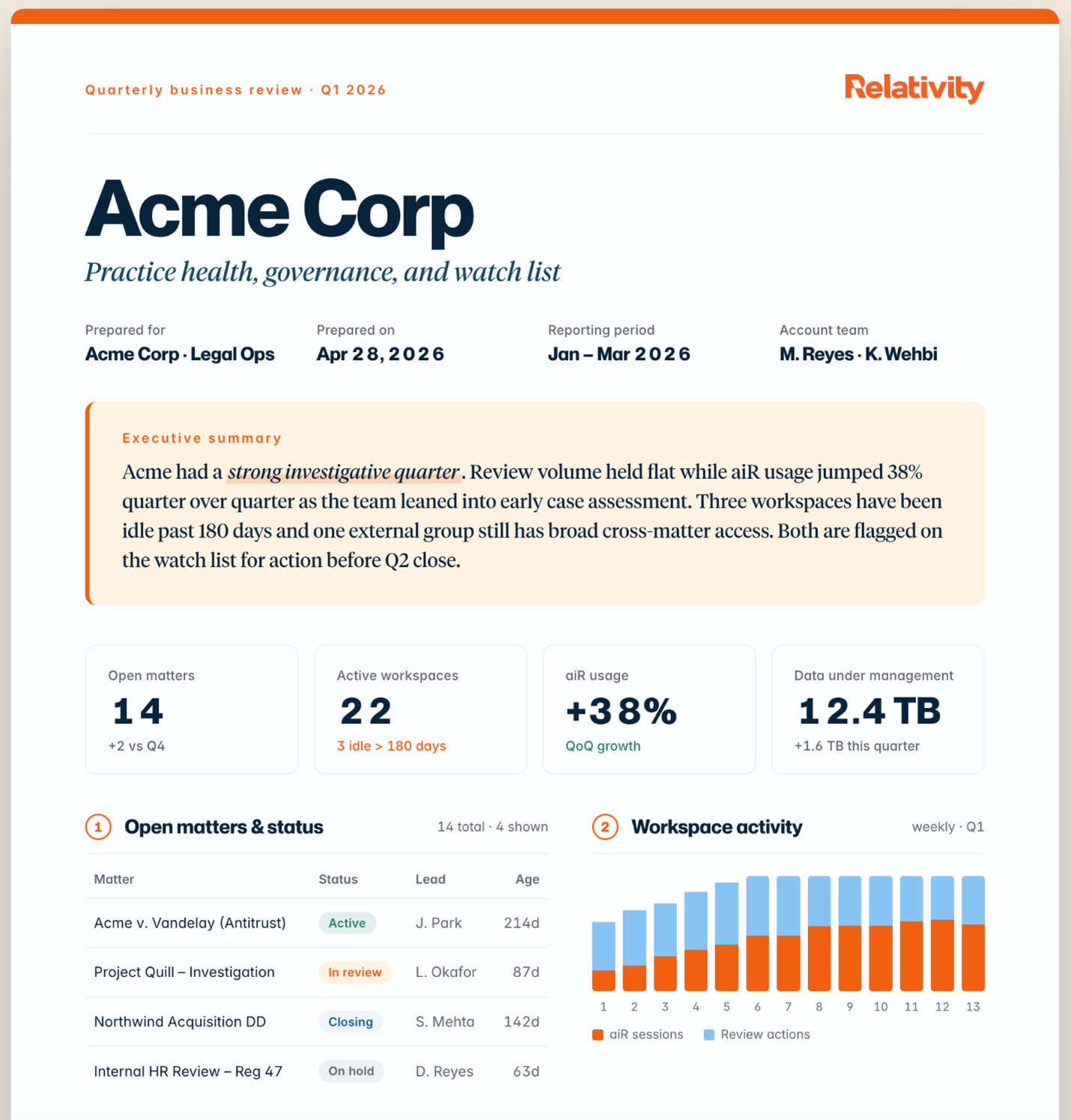
Quarterly Business Reviews (QBRs) are an example of operational work that often consumes hours of manual effort, gathering, and assembling, and presenting data.
With the MCP, an admin can simply ask Claude or Gemini Enterprise to generate a QBR brief, and the connector can assemble stats on open matters, workspace activity, access matrices, and flagged governance items – assembled in a customized, client-facing report using your own company branding.
Building a Smart, Secure, and Useful Legal Ecosystem
We've always designed Relativity as a platform that's ready for extension – through APIs, our app ecosystem, partner integrations, and all kinds of customizations from team to team.
The MCP represents a new manifestation of that vision. With generative and agentic AI sending pretty unmissable signals across the legal space, it's as important as ever to help teams work with RelativityOne in the ways that best suit their needs. At the same time, our principles require us to build solutions that prioritize security, clarity, and control every step of the way.
And it's particularly exciting because this is only the beginning. Administrative automation is where we're starting; it's high-volume, well-understood, and delivers immediate value. But the same conversational approach that simplifies setup today can, over time, extend to the fuller lifecycle of legal work. We will be thoughtful in how we approach that.
If your team doesn't work in Claude or Gemini Enterprise, you should know the experiences we're building here will help inform what we bring natively into RelativityOne. Our goal is for conversational, intelligent interaction with the platform to be available to every user, right where they already work. You shouldn't need a separate subscription to AI to benefit from the future we're building.
The MCP will expand to support additional integrations in the future. We can't wait to see what our users are able to do when their knowledge and creativity continue to be bolstered by agentic AI – inside the platform, and wherever they choose to work.
Getting Started
The MCP connector for Claude and Gemini Enterprise is available now. To learn how to enable the connector in your RelativityOne instance, read our documentation.
If you have more questions about setup or availability, contact support or your Relativity account team.
Graphics for this article were created by Kael Rose and Guss Tsatsakis.